
CREW SCHEDULING FOR LANDSCAPERS
The plan starts where crew scheduling leaves off.
Crew scheduling organizes where your crews need to be and when. For landscape companies running multiple crews and properties, it's an important part of planning the day.
The schedule only goes so far. Once the crew arrives, someone still decides how many people work each task and how the estimated hours get used across the property. CrewPlanner brings that into a job plan before the work begins.
Why do landscaping crews run over estimated hours?
The gap becomes easier to see when you look at what happens to the hours on an actual property.
Four people are sent to a property. One spends seven hours edging.
The hours add up at the end of the day, but when you look at how they were actually used, it isn't always clear what each person was doing or where the crew lost time.
An experienced foreman may know how that property should run, because he has worked it enough times to know where the crew loses time and how the work moves across the site. A lot of that knowledge comes from experience, and from trial and error.
Without a clear plan to work from, production decisions get made as the day unfolds. When the hours don't match the estimate, managers are left piecing together what happened afterward. For many landscape companies, experienced managers are essentially the system.
THE SCHEDULE ANSWERS
- Which crew goes to which property
- What day, and in what order of stops
- Who is on the truck
THE JOB PLAN ANSWERS
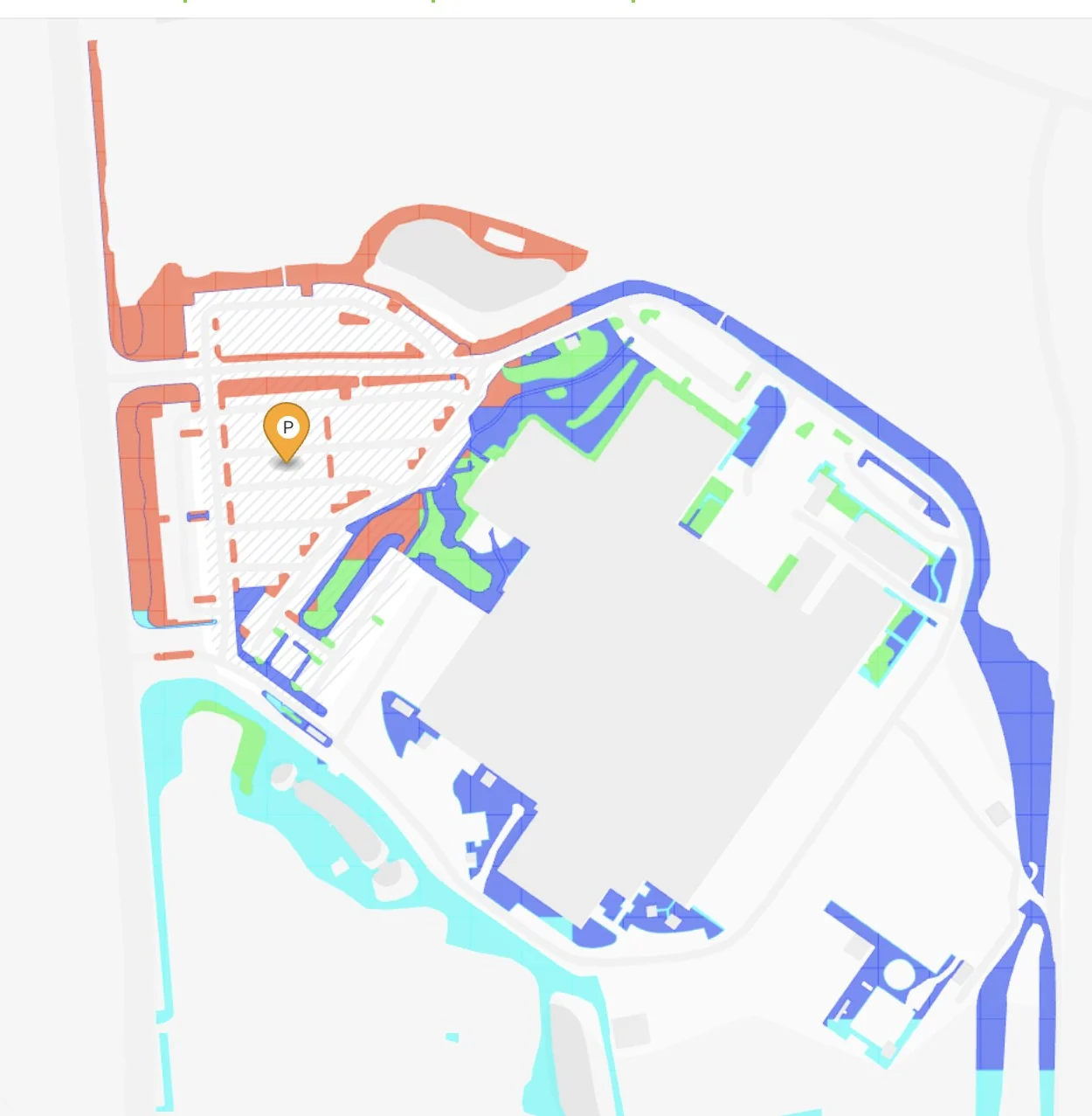
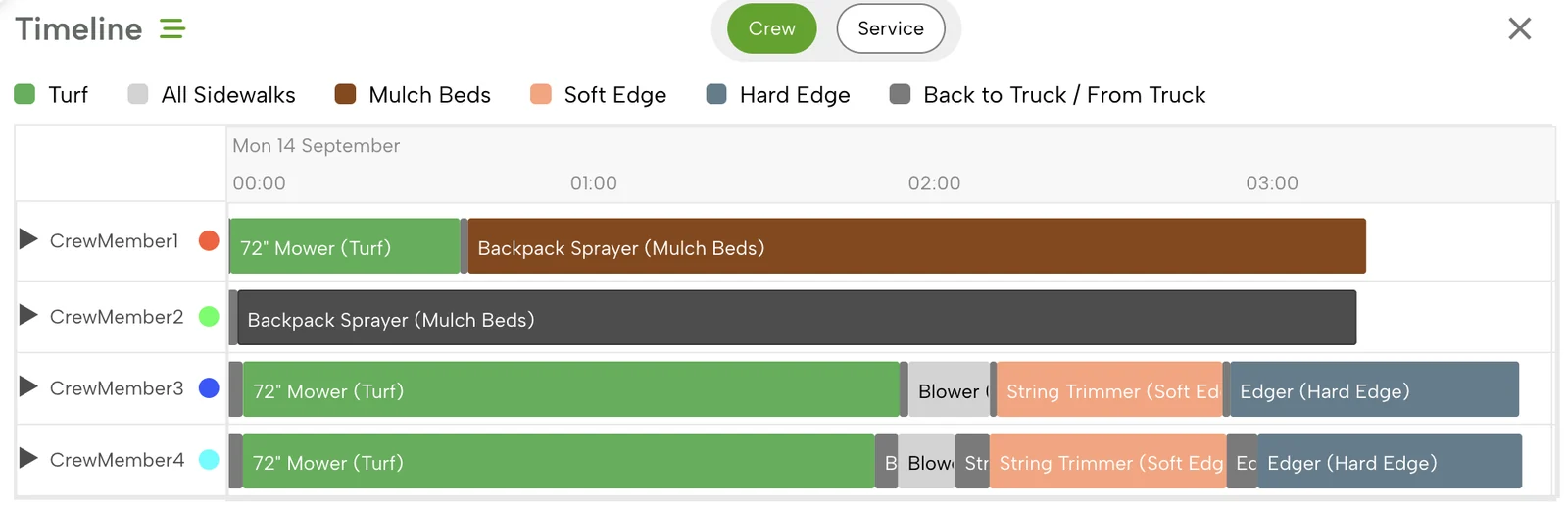
- Who works which part of the property
- With which equipment, in what sequence
- How long each task should take, walking included
What does a job plan actually look like?
A job plan gives each crew member a clear part of the property to work. Each person can see what they're responsible for and how much time is planned for it.
The plan also shows how the work should move across the property, so the crew isn't working out the sequence after they arrive. If someone has to walk between service areas, that time is accounted for instead of disappearing from the hours available for the work.
With the work mapped out before the crew starts, the foreman has a clearer picture of how the property is expected to run and how the plan fits within the hours in the estimate.
What changes when crews have a job plan?
A plan to compare against
When the actual hours don't match the estimate, managers can compare what happened against how the property was expected to run, instead of only seeing the overage at the end.
Know-how that stays
The plan captures what experienced foremen have learned about the property. If someone else has to run it, they aren't starting from scratch.
A starting point when someone calls in sick
Crews don't always show up exactly as scheduled. The manager still has the plan, and adjusts it for the crew that's actually there.
Context for the margin
Labor hours show up in the margin on every property. Comparing the plan with what actually happened shows where the hours are going and what may need to change.
How does CrewPlanner work with Aspire or LMN?
If you already run Aspire or LMN, keep using it. CrewPlanner works alongside those systems and focuses on the production plan for the property.
Once a crew is assigned to a property, CrewPlanner helps your team plan how the work should be handled within the hours in the estimate. It doesn't replace your scheduling system or change how your routes are built.
Is CrewPlanner right for your operation?
This tends to matter most once a portfolio is too big, or too complex, for one or two experienced people to carry every property plan in their head. A company running a small, familiar set of accounts that the same one or two people have worked for years may not need it yet.
As crews and headcount grow, new hires start taking on properties they haven't run before. The same challenge shows up on large or complex sites, where the difference between a real plan and a guess is measurable in hours. Often the clearest sign is a crew that finishes one property right on the estimate and runs long on another, with no clear explanation why.
How Fay-Ark found more capacity in its existing crews.
Fay-Ark Lawn Co. grew from four maintenance crews to nine in a single year. Within 90 days of putting CrewPlanner to work, it moved its largest properties onto one four-person crew and took a route off the schedule.
$15/hr
More revenue per crew hour on the crew running its plans fullest, now the company's highest-producing maintenance crew.
Fay-Ark Lawn Co. · On camera
1 route
Eliminated once one four-person crew took the biggest properties.
Fay-Ark Lawn Co.
1 truck
Never bought. Fay-Ark had planned another truck and foreman for its growth. The capacity was already in its crews.
Fay-Ark Lawn Co.
Frequently asked questions
How is this different from Aspire or LMN?
CrewPlanner works alongside the systems you already use to run your operation. Aspire or LMN keep handling the parts of the business you use them for today, while CrewPlanner focuses on how the work is planned at the property.
We already use scheduling software. Why isn't that enough?
If scheduling is working for you, you don't need to replace it. The issue CrewPlanner addresses comes up when properties still run over their estimated hours and it's hard to see why. CrewPlanner gives the crew a plan for the work before they start, so managers have something specific to manage against when actual hours don't match the estimate.
How does this scale to 400+ properties, or a 20-acre site?
A job plan is built around what each property actually needs, not a flat number based on acreage or crew size. That holds whether it's one large site with several distinct areas or a portfolio of several hundred smaller ones. The plan scales with the property, not the other way around.
What data do we need before we start?
You don't need a production plan already built. We start with the property addresses, the services on the contract and your estimated hours, plus a property map where you have one. We'll also ask about the crews and equipment you run, so the plan matches how you actually work.
How accurate are the production rates, and can we customize them?
CrewPlanner starts with industry-standard production rates. Once you're using it, data collected through CrewIntel vests shows how your crews actually perform on your properties, and the rates can be adjusted to reflect your own operation. The rates aren't fixed.
Do the plans update when scope changes?
Yes. Whether the scope changes or you're dealing with rain and a callout, you can adjust the plan for the conditions you actually have, instead of sticking to a plan built for a day that no longer exists.
How do crews actually access the plan in the field?
CrewPlanner generates a QR code that anyone on the team can scan with a phone to open the plan. Crew members see the work assigned to them, the equipment they'll need and the expected time for the work. That gives the crew a clear expectation on the property, and gives managers something specific to manage against at the end of the day.
See what a job plan actually looks like.
Get a real production plan for a real commercial property: work areas, crew assignments, equipment, sequence and calculated hours. Or book a demo, and we'll start with how your operation runs.